


Adaptive card variables are a way to dynamically include content into the Request field of your ticket using various properties of the ticket itself, or data from the fields on your custom form. The result is a Request field that provides you with more detailed information about the ticket without the need to open the ticket and view the details.


Ticket Variables
The following dynamic tags can be used in the Request field:
Requester
{{Ticket.Requester}}
The Requester of the Ticket.
Status
{{Ticket.Status}}
Ticket Type
{{Ticket.TicketType}}
Category
{{Ticket.Category}}
Priority
{{Ticket.Priority}}
Tags
{{Ticket.Tags}}
Affected Users
{{Ticket.AffectedUsers}}
Collaborators
{{Ticket.Collaborators}}
Assignment
{{Ticket.Assignment}}
Lists the Team, Group, and Assignee. Default Team and Group values can be configured in the Assignment field.
Team
{{Ticket.Team}}
Group
{{Ticket.Group}}
Due Date
{{Ticket.DueDate}}
Resolution Date
{{Ticket.ResolutionDate}}
Comment
{{Ticket.AddComment}}
If the Add Comment field is included on the form, then the comment can be added with this variable.
Form Variables
In addition to ticket variables, it is also possible to include information from generic form fields in the Request field. To use a form variable, it needs to have a unique id value set, which is then enclosed in a set of braces like the ticket variables. For example, a text field with an id value of CustomTextField, would be included in the Request field using {{CustomTextField}}.

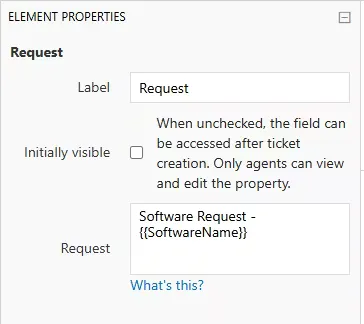
Above you can see the custom text input named SoftwareName, and how it is added to the Request field.
NOTE: The identifier for form variables is case-sensitive and needs to match the field id exactly.